
test 函数专题1
知识点回顾:
1. 函数的定义
2. 变量作用域:局部变量和全局变量
3. 函数的参数类型:位置参数、默认参数、不定参数
4. 传递参数的手段:关键词参数
5. 传递参数的顺序:同时出现三种参数类型时
作业:
题目1:计算圆的面积
● 任务: 编写一个名为 calculate_circle_area 的函数,该函数接收圆的半径 radius 作为参数,并返回圆的面积。圆的面积 = π * radius² (可以使用 math.pi 作为 π 的值)
● 要求:函数接收一个位置参数 radius。计算半径为5、0、-1时候的面积
● 注意点:可以采取try-except 使函数变得更加稳健,如果传入的半径为负数,函数应该返回 0 (或者可以考虑引发一个ValueError,但为了简单起见,先返回0)。
import mathdef calculate_circle_area(radius):try:radius = float(radius)   #计算圆的面积,参数 radius 表示圆的半径(可以是数字、字符串或其他类型)。if radius <= 0:raise ValueErrorreturn math.pi * radius ** 2except (ValueError, TypeError):print("输入无效,请输入一个正数")return 0print(calculate_circle_area(5))
print("-"*20)
print(calculate_circle_area(0))
print("-"*20)
print(calculate_circle_area(-1))
print("-"*20)
print(calculate_circle_area("a"))
print("-"*20)
print(calculate_circle_area(None))
题目2:计算矩形的面积
● 任务: 编写一个名为 calculate_rectangle_area 的函数,该函数接收矩形的长度 length 和宽度 width 作为参数,并返回矩形的面积。
● 公式: 矩形面积 = length * width
● 要求:函数接收两个位置参数 length 和 width。
○ 函数返回计算得到的面积。
○ 如果长度或宽度为负数,函数应该返回 0。
原始版:
def calculate_rectangle_area(length, width):if length <= 0 or width <= 0:return 0return length * widthprint(calculate_rectangle_area(5, 3))   # 正常情况
print("-"*20)
print(calculate_rectangle_area(0, 3))   # 边界情况
print("-"*20)
print(calculate_rectangle_area(5, 0))   # 边界情况
print("-"*20)
print(calculate_rectangle_area(-1, 3))  # 非法输入
尝试加入try-except:
def calculate_rectangle_area(length, width):try:if length <= 0 or width <= 0:raise ValueErrorreturn length * widthexcept ValueError:print("输入的长度和宽度必须都大于0")return 0print(calculate_rectangle_area(5, 3))   # 正常情况
print("-"*20)
print(calculate_rectangle_area(0, 3))   # 边界情况
print("-"*20)
print(calculate_rectangle_area(5, 0))   # 边界情况
print("-"*20)
print(calculate_rectangle_area(-1, 3))  # 非法输入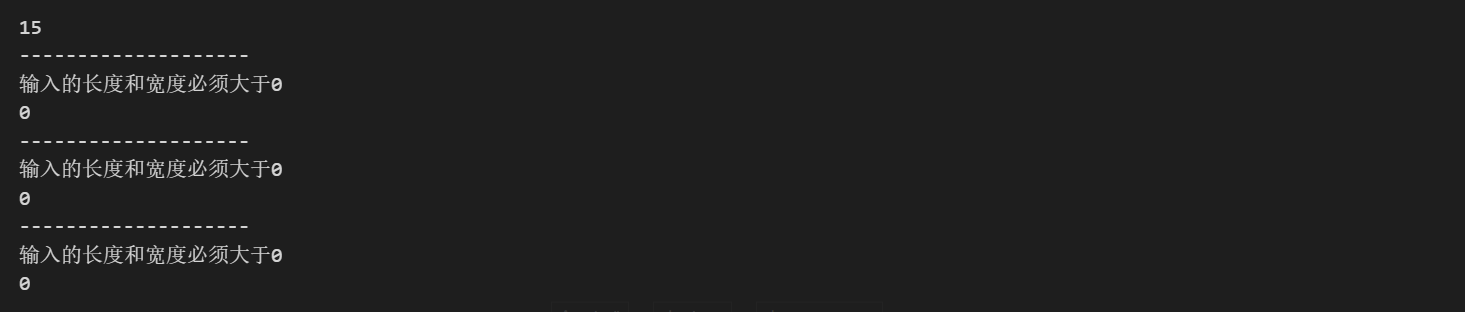
题目3:计算任意数量数字的平均值
● 任务: 编写一个名为 calculate_average 的函数,该函数可以接收任意数量的数字作为参数(引入可变位置参数 (*args)),并返回它们的平均值。
● 要求:使用 *args 来接收所有传入的数字。
○ 如果没有任何数字传入,函数应该返回 0。
○ 函数返回计算得到的平均值。
原始版:
def calculate_average(*args):if len(args) == 0:return 0return sum(args) / len(args)print(calculate_average(1, 2, 3, 4, 5))  # 正常情况
print(calculate_average())  # 边界情况
print(calculate_average(0))  # 边界情况
print(calculate_average(-1, -2, -3))  # 正常情况
但是这种没有解决如果传入的是非数字怎么办,如果传入的是字母就会报错
#传入字母,会报错def calculate_average(*args):if len(args) == 0:return 0return sum(args) / len(args)print(calculate_average(1, 2, 3, 4, 5))  # 正常情况
print(calculate_average())  # 边界情况
print(calculate_average(0))  # 边界情况
print(calculate_average(-1, -2, -3))  # 正常情况
print("-"*20)
print(calculate_average("a", "b", "c")) #传入字母,会报错
原因是因为TypeError
尝试加入try-except解决这个问题:
def calculate_average(*args):try:if not args:  # 检查是否有参数传入raise ValueErrorreturn sum(args) / len(args)except (ValueError,TypeError):print("Error: No arguments provided")return 0  # 如果没有参数传入,返回0print(calculate_average(1, 2, 3, 4, 5))  # 正常情况
print("-"*20)
print(calculate_average())  # 边界情况
print("-"*20)
print(calculate_average(0))  # 边界情况
print("-"*20)
print(calculate_average(-1, -2, -3))  # 正常情况
print("-"*20)
print(calculate_average("a", "b", "c"))  # 异常情况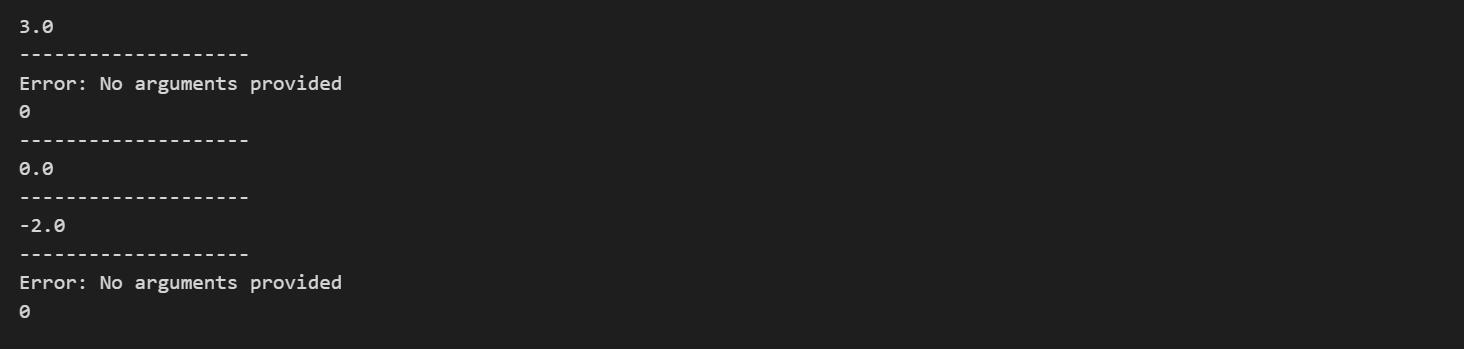
题目4:打印用户信息
● 任务: 编写一个名为 print_user_info 的函数,该函数接收一个必需的参数 user_id,以及任意数量的额外用户信息(作为关键字参数)。
● 要求:
○ user_id 是一个必需的位置参数。
○ 使用 **kwargs 来接收额外的用户信息。
○ 函数打印出用户ID,然后逐行打印所有提供的额外信息(键和值)。
○ 函数不需要返回值
def print_user_info(user_id,**kwargs):print("User ID:", user_id)for key, value in kwargs.items():print(key, ":", value)print_user_info(0)
print("-"*20)
print_user_info(1, name="Alice", age=25, city="New York")
print("-"*20)
print_user_info(2, name="Bob", age=30, city="Los Angeles", occupation="Engineer")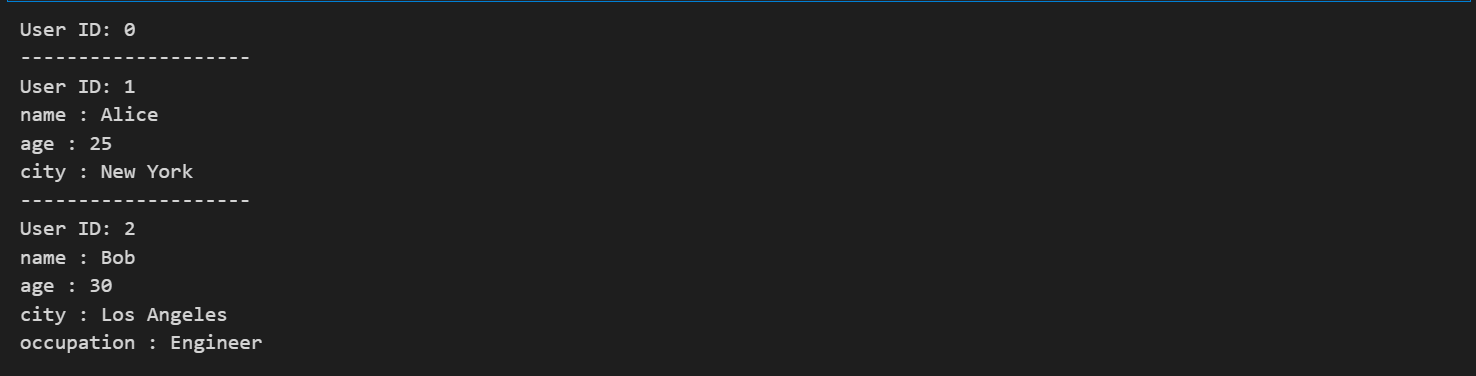
题目5:格式化几何图形描述
● 任务: 编写一个名为 describe_shape 的函数,该函数接收图形的名称 shape_name (必需),一个可选的 color (默认 “black”),以及任意数量的描述该图形尺寸的关键字参数 (例如 radius=5 对于圆,length=10, width=4 对于矩形)。
● 要求:shape_name 是必需的位置参数。
○ color 是一个可选参数,默认值为 “black”。
○ 使用 **kwargs 收集描述尺寸的参数。
○ 函数返回一个描述字符串,格式如下:
○ “A [color] [shape_name] with dimensions: [dim1_name]=[dim1_value], [dim2_name]=[dim2_value], …”如果 **kwargs 为空,则尺寸部分为 “with no specific dimensions.”
desc1 = describe_shape("circle", radius=5, color="red")
print(desc1)
# 输出: A red circle with dimensions: radius=5
desc2 = describe_shape("rectangle", length=10, width=4)
print(desc2)
# 输出: A black rectangle with dimensions: length=10, width=4
desc3 = describe_shape("triangle", base=6, height=8, color="blue")
print(desc3)
# 输出: A blue triangle with dimensions: base=6, height=8
desc4 = describe_shape("point", color="green")
print(desc4)
# 输出: A green point with no specific dimensions.
原始版:
def describe_shape(shape_name, color="black", **kwargs):print(f"A {color} {shape_name} ")if kwargs:print("with dimensions:")for key, value in kwargs.items():print(f"{key}={value}")else:print("with no specific dimensions.")# 示例
desc1 = describe_shape("circle", radius=5, color="red")
print(desc1)
# 输出: A red circle with dimensions: radius=5
print("-"*20)desc2 = describe_shape("rectangle", length=10, width=4)
print(desc2)
# 输出: A black rectangle with dimensions: length=10, width=4
print("-"*20)desc3 = describe_shape("triangle", base=6, height=8, color="blue")
print(desc3)
# 输出: A blue triangle with dimensions: base=6, height=8
print("-"*20)desc4 = describe_shape("point", color="green")
print(desc4)
# 输出: A green point with no specific dimensions.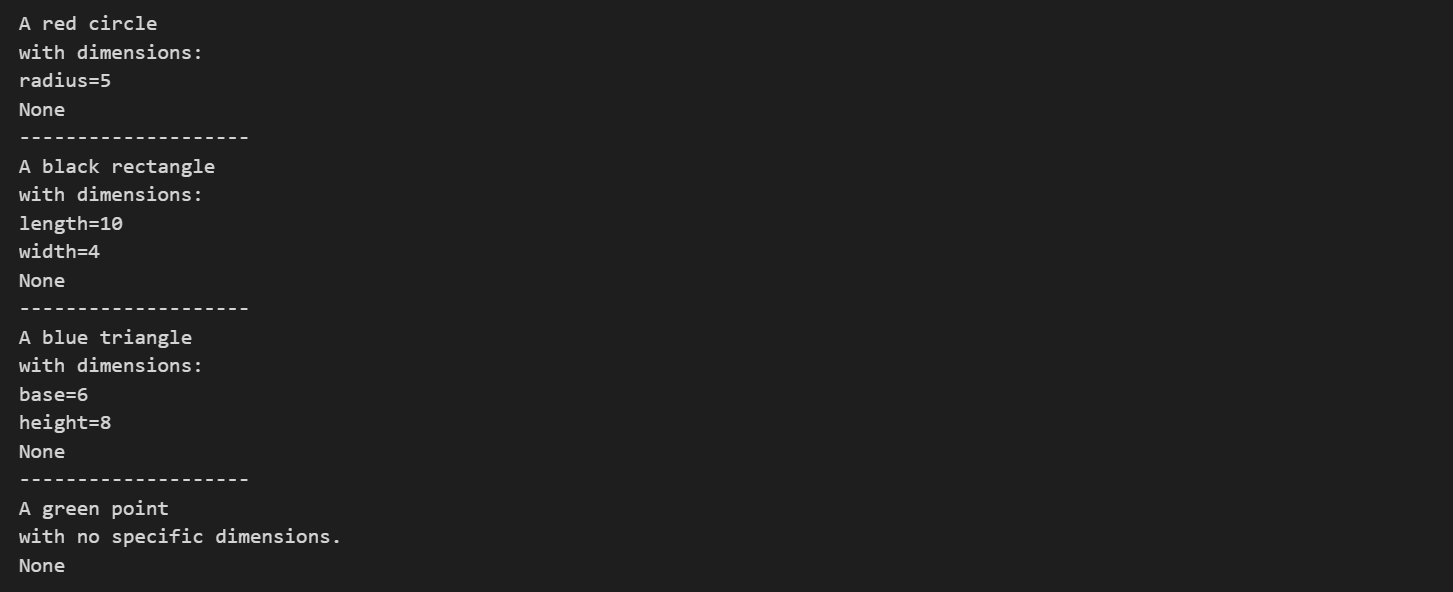
可以正常运行,但是可以看到,输出结果并不在同一行上。尝试解决这一问题
def describe_shape(shape_name, color="black", **kwargs):print(f"A {color} {shape_name} ", end="")if kwargs:print("with dimensions:", end="")for key, value in kwargs.items():print(f" {key}={value}", end=",")else:print("with no specific dimensions.", end="")print()  # 结束当前行# 示例
desc1 = describe_shape("circle", radius=5, color="red")
print(desc1)
# 输出: A red circle with dimensions: radius=5
print("-"*20)desc2 = describe_shape("rectangle", length=10, width=4)
print(desc2)
# 输出: A black rectangle with dimensions: length=10, width=4
print("-"*20)desc3 = describe_shape("triangle", base=6, height=8, color="blue")
print(desc3)
# 输出: A blue triangle with dimensions: base=6, height=8
print("-"*20)desc4 = describe_shape("point", color="green")
print(desc4)
# 输出: A green point with no specific dimensions.
现在每次调用输出在同一行了,但是可以观察到,最后是以“,”结尾
再次尝试解决
def describe_shape(shape_name, color="black", **kwargs):print(f"A {color} {shape_name} ", end="")if kwargs:print("with dimensions:", end="")items = list(kwargs.items())for i, (key, value) in enumerate(items):  # 对每个参数,除了最后一个外,都添加逗号end_char = "," if i < len(items) - 1 else ""print(f" {key}={value}", end=end_char)else:print("with no specific dimensions.", end="")print()  # 结束当前行# 示例
desc1 = describe_shape("circle", radius=5, color="red")
print(desc1)
# 输出: A red circle with dimensions: radius=5
print("-"*20)desc2 = describe_shape("rectangle", length=10, width=4)
print(desc2)
# 输出: A black rectangle with dimensions: length=10, width=4
print("-"*20)desc3 = describe_shape("triangle", base=6, height=8, color="blue")
print(desc3)
# 输出: A blue triangle with dimensions: base=6, height=8
print("-"*20)desc4 = describe_shape("point", color="green")
print(desc4)
# 输出: A green point with no specific dimensions.
阅读了一篇训练营其他友友的打卡分享,还可以用.join方法
def describe_shape(shape_name, color="black", **kwargs):description = f"A {color} {shape_name}"if kwargs:dimensions = ", ".join(f"{k}={v}" for k, v in kwargs.items())description += f" with dimensions: {dimensions}"else:description += " with no specific dimensions."return descriptionprint(describe_shape("circle", radius=5))
print(describe_shape("rectangle", "blue", length=10, width=4))
print(describe_shape("triangle", side1=3, side2=4, side3=5))
print(describe_shape("square"))
笔记
1.函数的基本写法如下所示:
def function_name(parameter1, parameter2, ...):"""Docstring: 描述函数的功能、参数和返回值 (可选但强烈推荐)"""# 函数体: 实现功能的代码# ...return value # 可选,用于返回结果1.def: 关键字,表示开始定义一个函数。
2.function_name: 函数的名称,应遵循Python的命名约定(通常是小写字母和下划线,例如 calculate_area,用英文单词含义和下划线来作为函数名)。
3.parameter1, parameter2, ...: 函数的参数(也叫形参),是函数在被调用时接收的输入值。参数是可选的。
(): 参数列表必须放在圆括号中,即使没有参数,括号也不能省略。
: 冒号表示函数定义的头部结束,接下来是缩进的函数体。
Docstring (文档字符串): 位于函数定义第一行的多行字符串(通常用三引号 """Docstring goes here""")。用于解释函数的作用、参数、返回值等。可以通过 help(function_name) 或 function_name.__doc__ 查看。这个写法可选,为了后续维护和查看,建议加上这一段更加规范
4.函数体 (Function Body): 缩进的代码块,包含实现函数功能的语句。
5.return value: return 语句用于从函数中返回一个值。如果函数没有 return 语句,或者 return 后面没有值,它会自动返回 None。一个函数可以有多个 return 语句(例如在不同的条件分支中)
2.*args 和 **kwargs 的核心目的是让函数能够接收不定数量的参数,并以元组和字典的形式在函数内部进行处理。
也就是说 当位置参数用完了 就自动变成*args,当关键词参数用完了 就自动变成**kwarges
@浙大疏锦行


