
产品的需求千奇百怪,但作为一个万能前端怎么能难倒我呢?借助 AI 工具这不分分钟就解决了吗,来吧展示!
实现思路
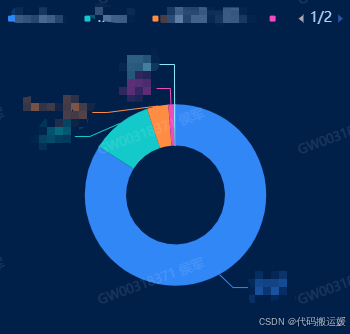
通过对 series 中的 data 的 label 进行控制,只展示部分就好了。
let label = {show:true,// alignTo: 'edge',//对其边线,防止超出可视区被切割// fontSize: 'calc(100vw * 11 / 1920)',position: 'outside',// color:'#fff',// 默认颜色是饼块的颜色formatter(params){return `{a|${params.name}}\n{b|${params.percent}%}`;},rich: {a: {fontSize: 'calc(100vw * 11 / 1920)'},b: {fontSize: 'calc(100vw * 10 / 1920)'}}}// 设置标签指示线的样式let labelLine = {show: true,lineStyle:{ // 指示线样式,默认为饼块颜色// color: '#fff'}}// 这里是我自己封装的 饼图组件,只把数据处理好就可以了this.seriesData = data.map((item, index) => {return {name: item.name,value: item.value,rate: item.rate!= null ? item.rate: '-',label: index < 5 ? label : '',labelLine: index < 5 ? labelLine : ''}})
附上组件的封装代码:
<template><div style="width: 100%; height: 100%" class="echarts" ref="chart"></div>
</template><script>
export default {components: {},props: {chartData: {type: Array},customOption: {type: Object,default: () => {}}},watch: {// 监听数据变化,重新渲染图表isFullscreen: {handler(){this.charts && this.charts.resize && this.charts.resize()}},//监听数据变化,重新渲染图表chartData: {handler(val, oldVal) {if (val && JSON.stringify(val) != "{}") {this.$nextTick(() => {this.drawCharts();});}},deep: true,},"$store.state.app.sidebar.opened":{handler(val, oldVal) {setTimeout(() => {this.charts && this.charts.resize && this.charts.resize()}, 200);},},},computed: {chartDataNew(){let obj = this.deepMerge({}, this.commonOptions, this.customOption);obj.series[0].data = this.chartData;return obj;}},data() {return {charts: null,commonOptions: {color: ['#3287f7', '#14c9c9', '#ff8c43', '#ef4bc2', '#90e7ff'],legend: {// icon: "rect",itemWidth: 6,itemHeight: 6,top: '2%',left: 'center',itemGap: 20,// selectedMode: false // 取消图例的点击事件},series: [{// name: 'Access From',type: 'pie',radius: ['30%', '55%'],center: ['50%', '60%'],avoidLabelOverlap: false, // 启用防止标签重叠策略itemStyle: {borderRadius: 10,borderColor: 'transparent',borderWidth: 2},label: {show: false,position: 'center'},labelLine: {show: false},data: []}]}};},mounted() {this.drawCharts();},methods: {// 多个嵌套对象深度合并的方法deepMerge(target, ...sources){sources && sources.forEach(source => {let arr = source && Object.keys(source);arr && arr.length && arr.forEach(key => {if (source[key] && typeof source[key] === 'object') {if (typeof target[key] !== 'object' || target[key] === null) {target[key] = Array.isArray(source[key]) ? [] : {};}deepMerge(target[key], source[key]);} else {target[key] = source[key];}});});return target;},drawCharts(){this.charts = this.$echarts.init(this.$refs.chart);const option = this.chartDataNew;this.charts.clear(); // 在渲染之前先清空所有状态,解决在参数变化重新发请求时,导致环形图中间文字渲染错乱问题this.charts.setOption(option, true);window.addEventListener("resize", this.charts.resize);this.$once("hook:beforeDestroy", () => {window.removeEventListener("resize", this.charts.resize);});}}
}
</script><style scoped lang='scss'>
</style>


:容器存储接口 CSI)


